Work About Sketchbook Contact
Back to Portfolio
Case Study 6: Trust Accounting

Plaid Integration for Trust Accounting

Automating bank reconciliation for legal practice management

Role Lead Product Designer
Team PM, 4 Engineers, Accounting SMEs
Platform SaaS Web Application
Impact Enterprise-tier Adoption
Plaid Integration Reconciliation Dashboard
Scroll to explore
01

Overview

The Challenge

I led the design of a Plaid-powered bank integration that automated transaction imports and reconciliation, replacing error-prone manual bookkeeping workflows for thousands of law firms.

Over the course of the project, I collaborated with product, engineering, and accounting subject matter experts to research workflows, prototype solutions, and iterate on designs that ensured financial correctness under strict legal trust-accounting constraints.

Goals

  • Reduce manual bookkeeping time for law firms
  • Ensure accounting accuracy and legal compliance
  • Increase user trust in displayed balances
  • Position PracticePanther's trust accounting module to compete with Clio and MyCase

Team

Lead Product Designer 1
Product Manager 1
Engineers 4
Accounting SMEs 2
Customer Support 1

My Responsibilities

User Research Interaction Design Prototyping Usability Testing System Design
02

The Challenge: Beyond the Interface

The Problem

Manual Reconciliation in a Compliance-Heavy Domain

Law firms were reconciling bank statements via CSV uploads and Excel — a process that was slow, error-prone, and risked compliance audits. Any error in trust account reconciliation could mean a violation.

Manual CSV imports create data entry errors and duplicate entries
Weekly reconciliation batches take hours of accountant time
Trust accounts require strict legal compliance — errors risk audit flags
No automated matching — every transaction verified manually
Business Context

The Strategic Imperative

A Plaid integration was the core flow required to launch Panther Accounting Plus and drive high-value enterprise subscriptions.

Gate feature for Enterprise-tier subscriptions
Must handle financial correctness, compliance, and user trust
Also needed a CSV fallback for banks without Plaid support

Competitors already offered this:

Clio MyCase

"How can I make reconciliation seamless for billing and accountants in medium-to-large law firms, so they trust us and stay compliant?"

03

Discovery & Strategic Insights

To understand how law firms managed reconciliation, we conducted comprehensive research:

0 Law firm interviews across varying sizes
0 Research methods: interviews, workflow shadowing, competitive audit

Key Findings

Observation

Users reconcile weekly in batches

Design bulk workflows, not one-at-a-time processing

Observation

Fear of errors outweighs need for speed

Show verification states and confirmation before committing

Observation

CSV uploads confuse mental models

Design a guided matching UI that also serves as a fallback for non-Plaid banks

Observation

Firms manage multiple bank accounts

Provide explicit Trust vs Operating account separation

Product Goals

Reduce manual bookkeeping time

Ensure accounting accuracy and compliance

Increase user trust in displayed balances

Support Plaid-connected and CSV fallback workflows

04

Solution Architecture: 3-Phase Strategy

Instead of designing a simple "Import Transactions" feature, I reframed the experience into three logical phases to reduce cognitive load and build user trust progressively.

Phase 1

Connect

Securely link bank accounts via Plaid with a transparent OAuth flow. Build immediate trust through clear success and error states.

Phase 2

Normalize

Standardize messy, inconsistent bank data into a structured format. Handle deduplication, pending vs cleared states, and nightly auto-syncs.

Phase 3

Match & Reconcile

A guided UI that suggests matches, flags discrepancies, and allows users to categorize unrecognized items with confidence.

User Flow: Reconciliation Journey

🏦
Connect Bank

Link via Plaid OAuth

📥
Import Transactions

Auto-sync & normalize

🔍
Match & Categorize

Drag-drop or define

Reconciled

Accounts balanced

Phase 1: Bank Connection Flow

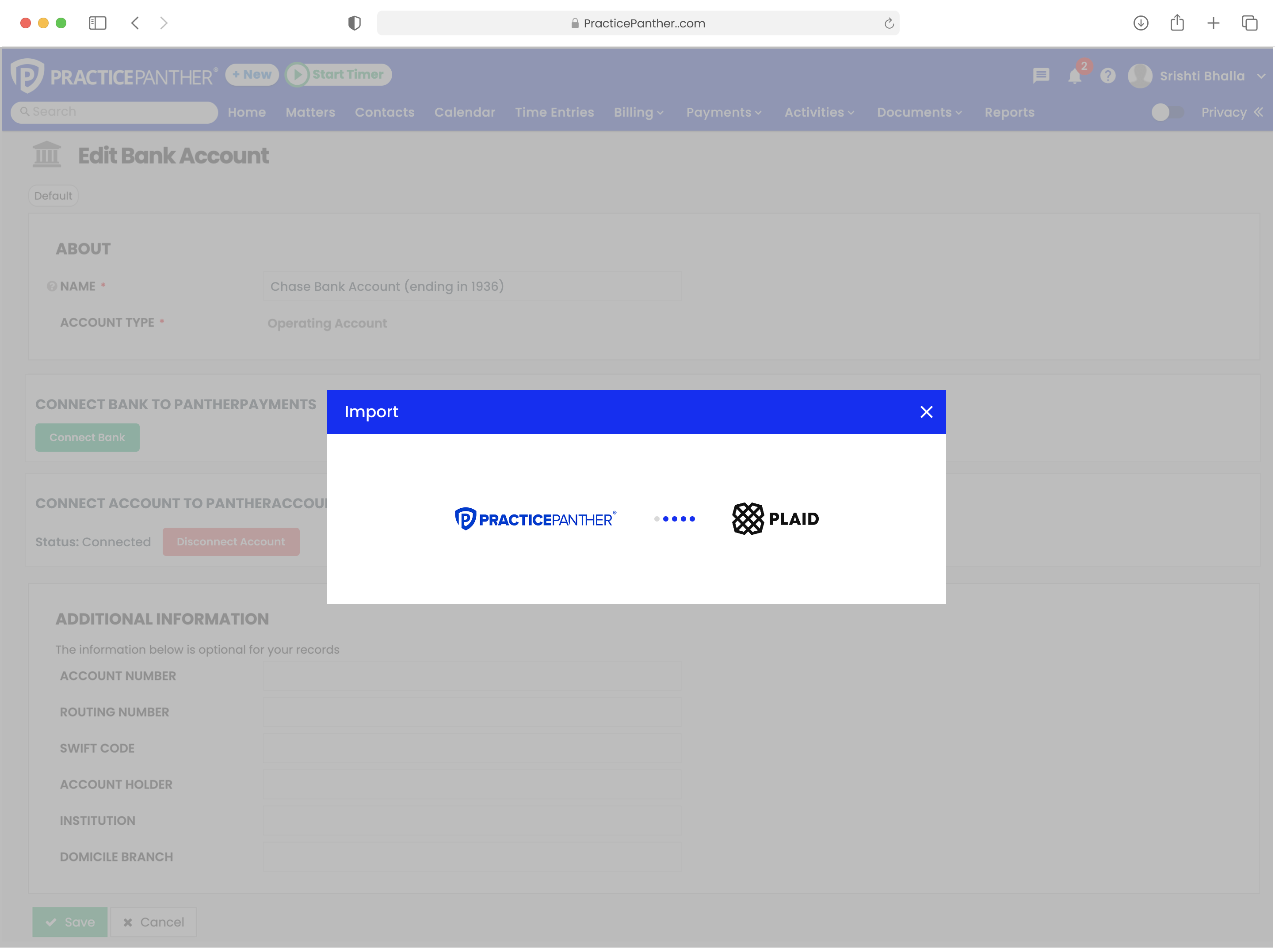
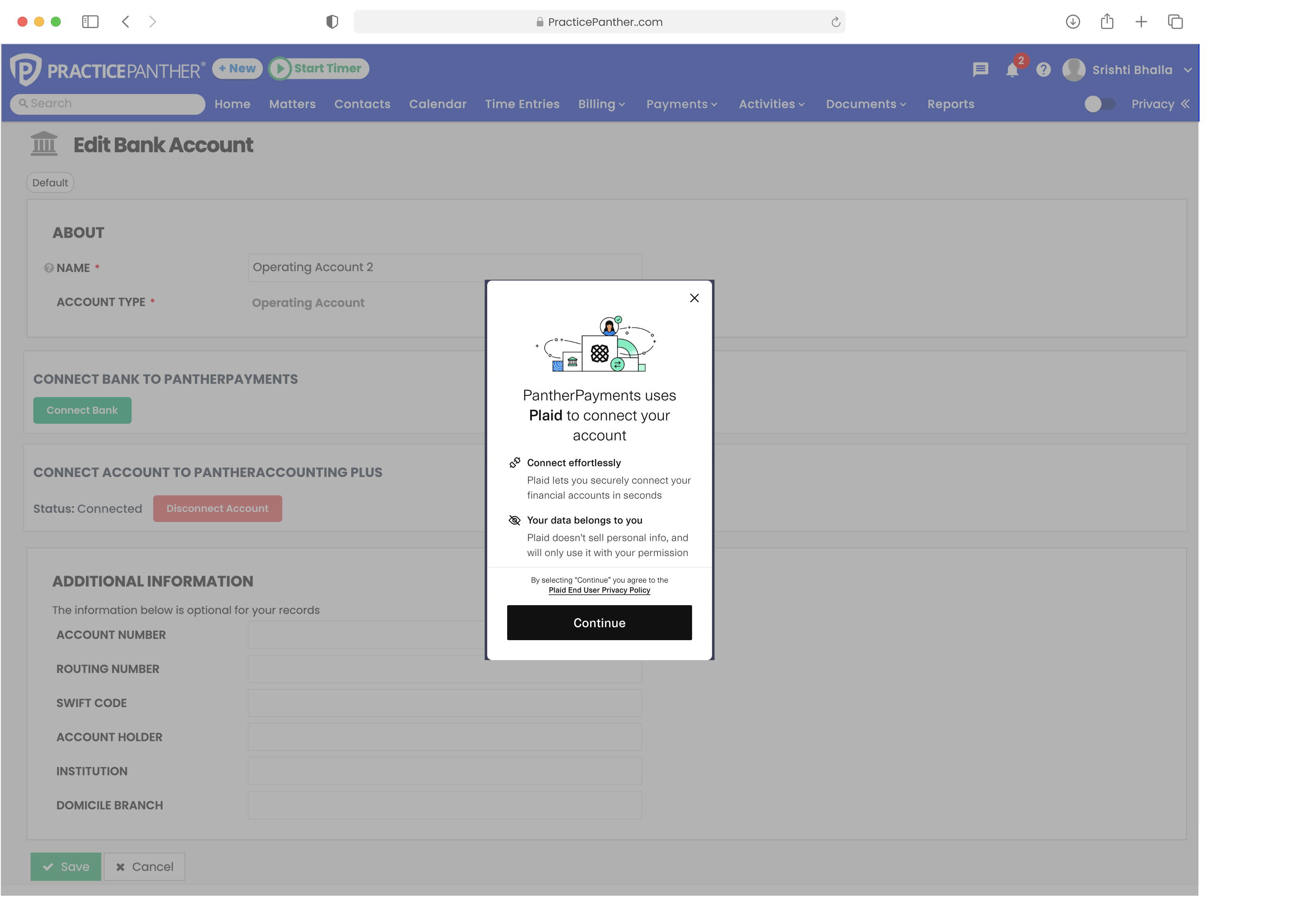
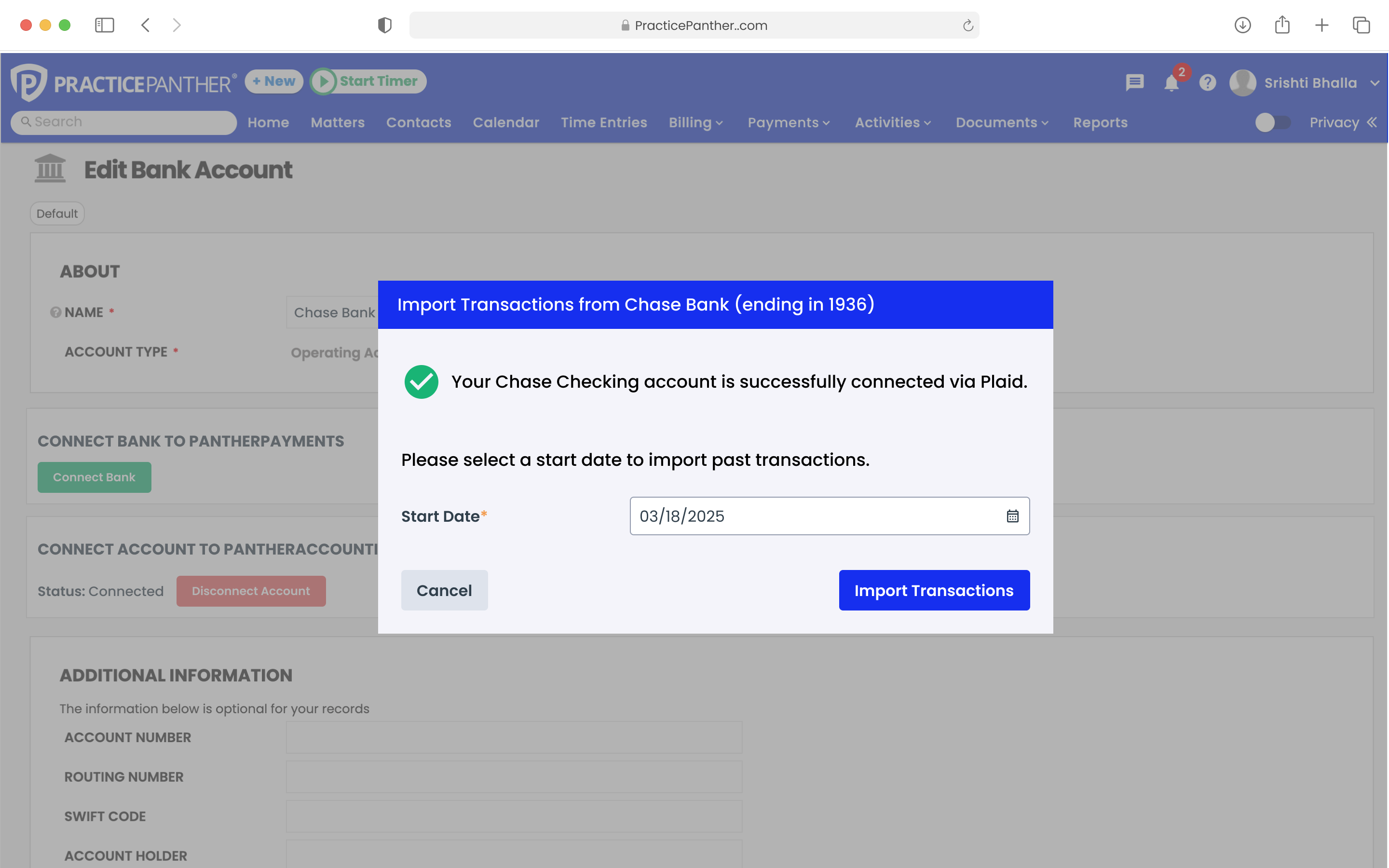
The connection flow starts from the Edit Bank Account page, keeping the action contextual. The Plaid OAuth modal clearly communicates the PracticePanther ↔ Plaid relationship. On success, users select a start date to control import scope.

Plaid import initiation from Edit Bank Account page

Import modal from Edit Bank Account

Plaid OAuth consent screen building trust

Plaid OAuth consent screen

Import success with date picker for transaction range

Success state with date picker

05

Iteration & Design Evolution

The reconciliation UI went through three major iterations before arriving at the final solution. Each iteration was informed by user testing and engineering feedback.

1

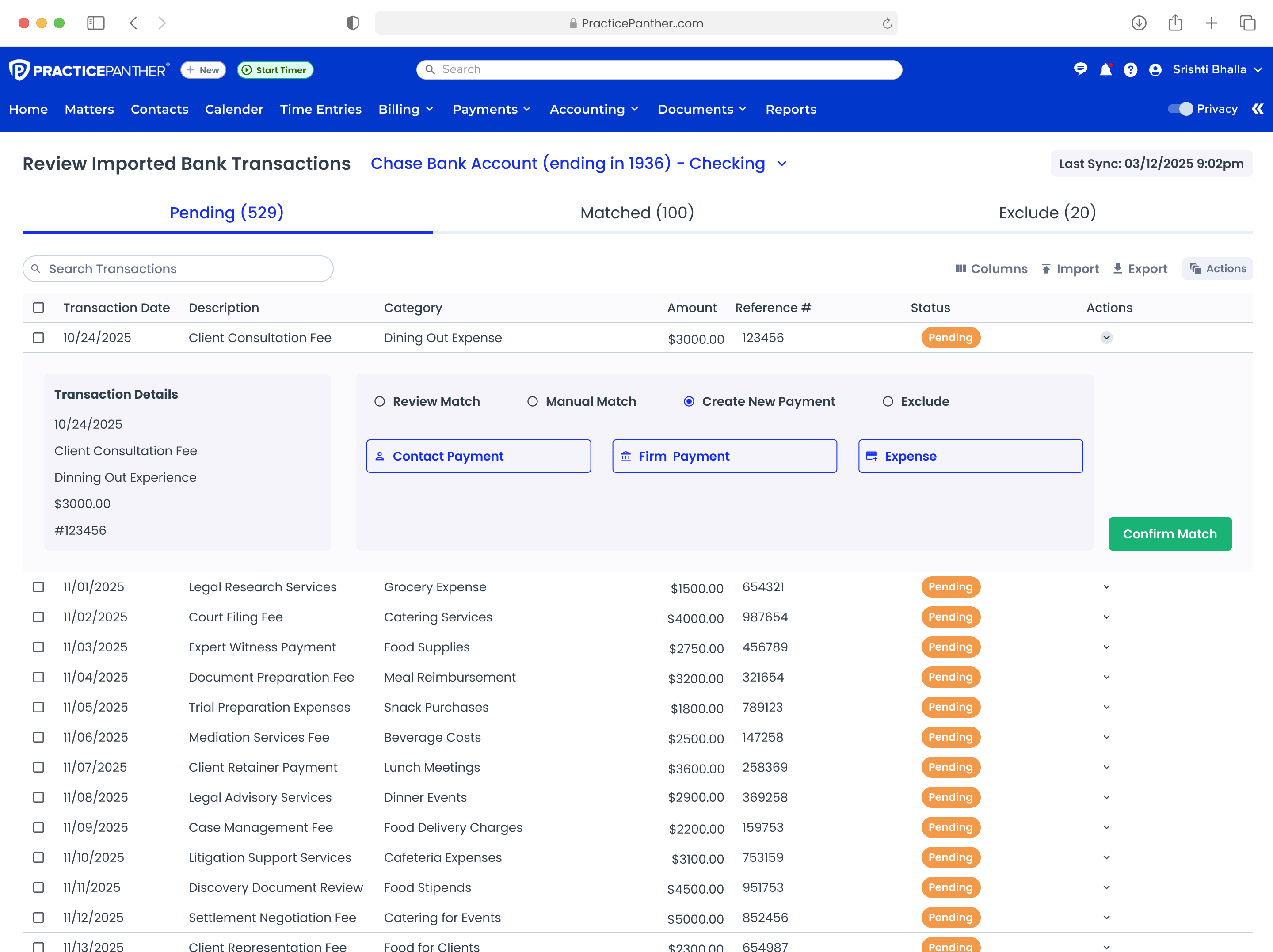
Table with Inline Actions

Tested & Pivoted

Approach

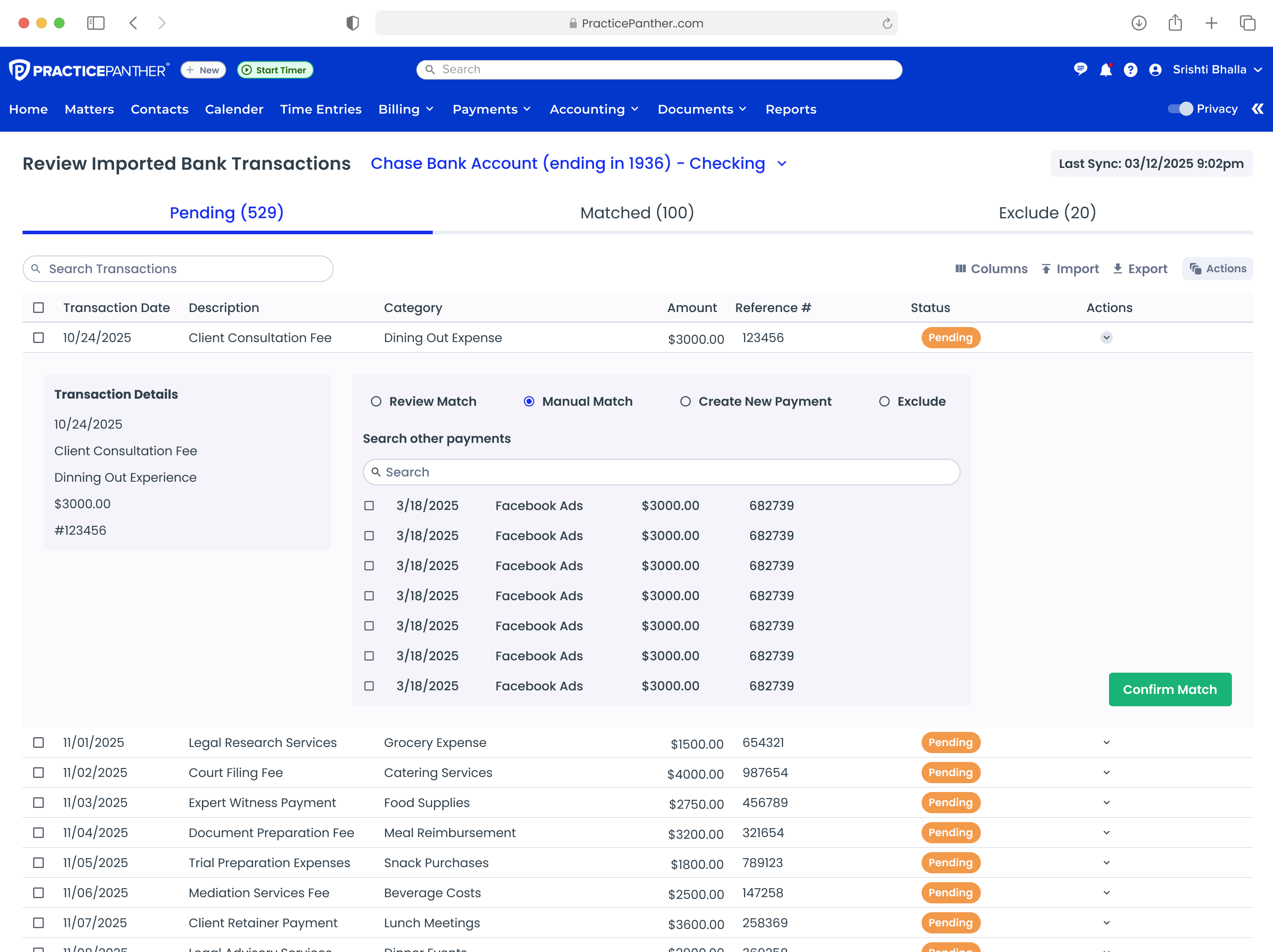
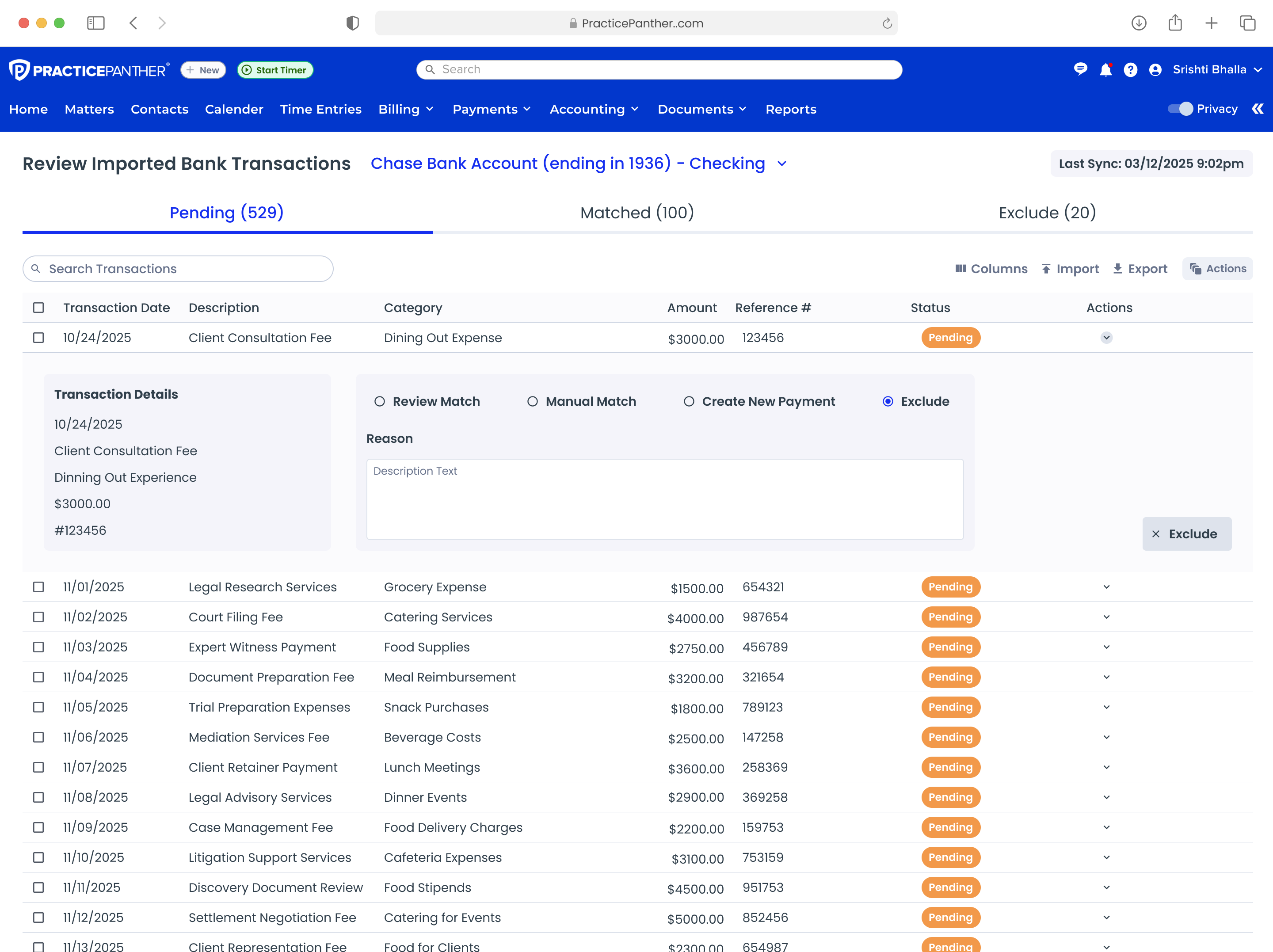
A full-width data table showing all imported transactions. Each row expanded inline to reveal four action tabs: Review Match, Manual Match, Create New Payment, and Exclude.

What We Tested

Suggested matches with "Confirm Match" actions. Inline searchable grid for manual matching. Category selectors for unrecognized transactions (Contact Payment, Firm Payment, Expense). Required reason fields for excluded transactions.

Iteration 1: Table with inline Review Match tab

Review Match tab

Iteration 1: Manual match with inline grid search

Inline grid matching

Iteration 1: Exclude tab with reason field

Exclude with reason

2

Table with Status Actions

Refined Direction

Approach

Refined the table with a dedicated "Matched Status" column using color-coded badges and a persistent Actions column with contextual buttons (Confirm Suggested, Manual Match, Create New, Exclude).

Iteration 2: Table with color-coded status badges and action buttons

Status badges with contextual action buttons

3

Modal-Based Matching

Close, But Not Final

Approach

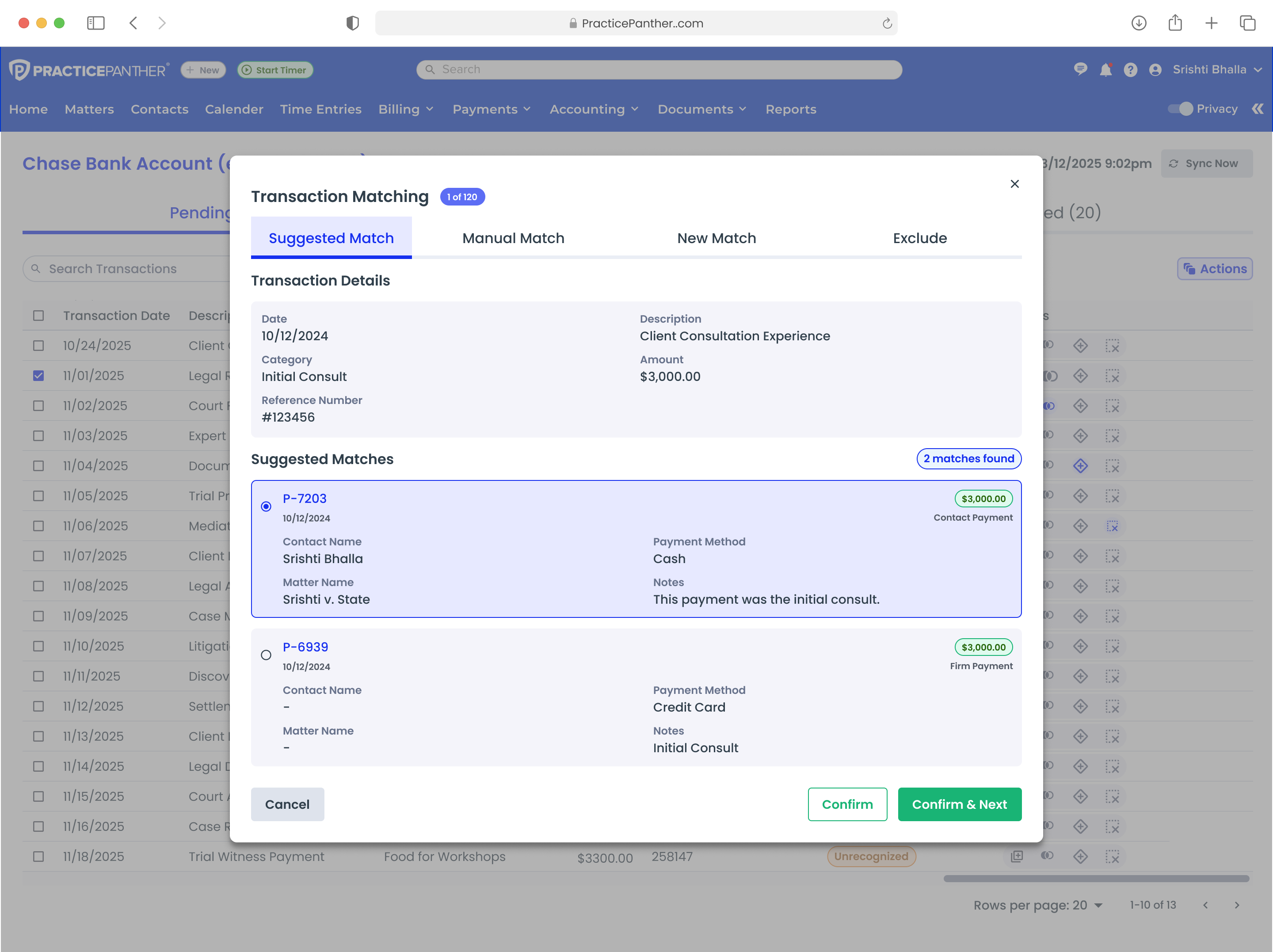
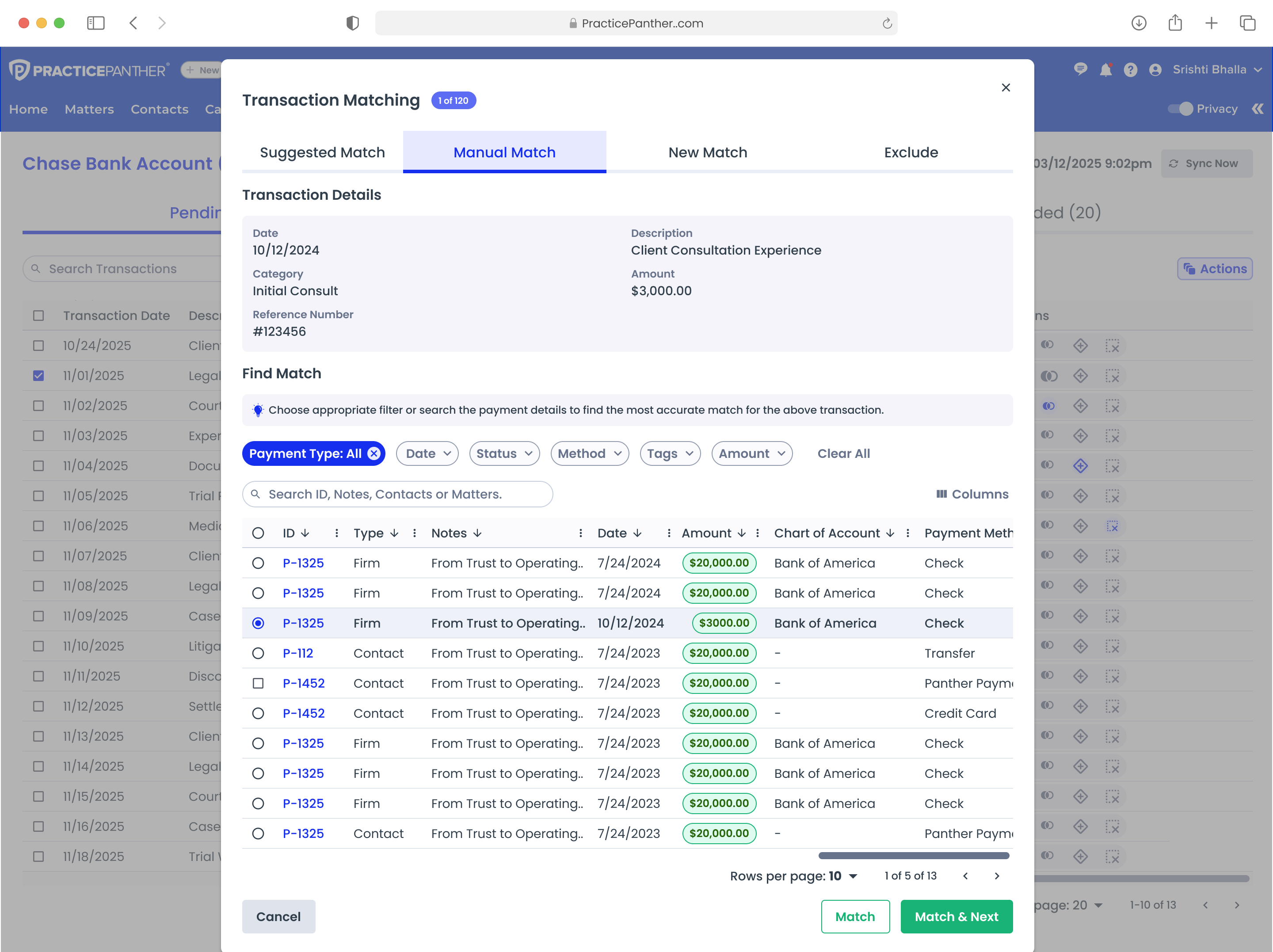
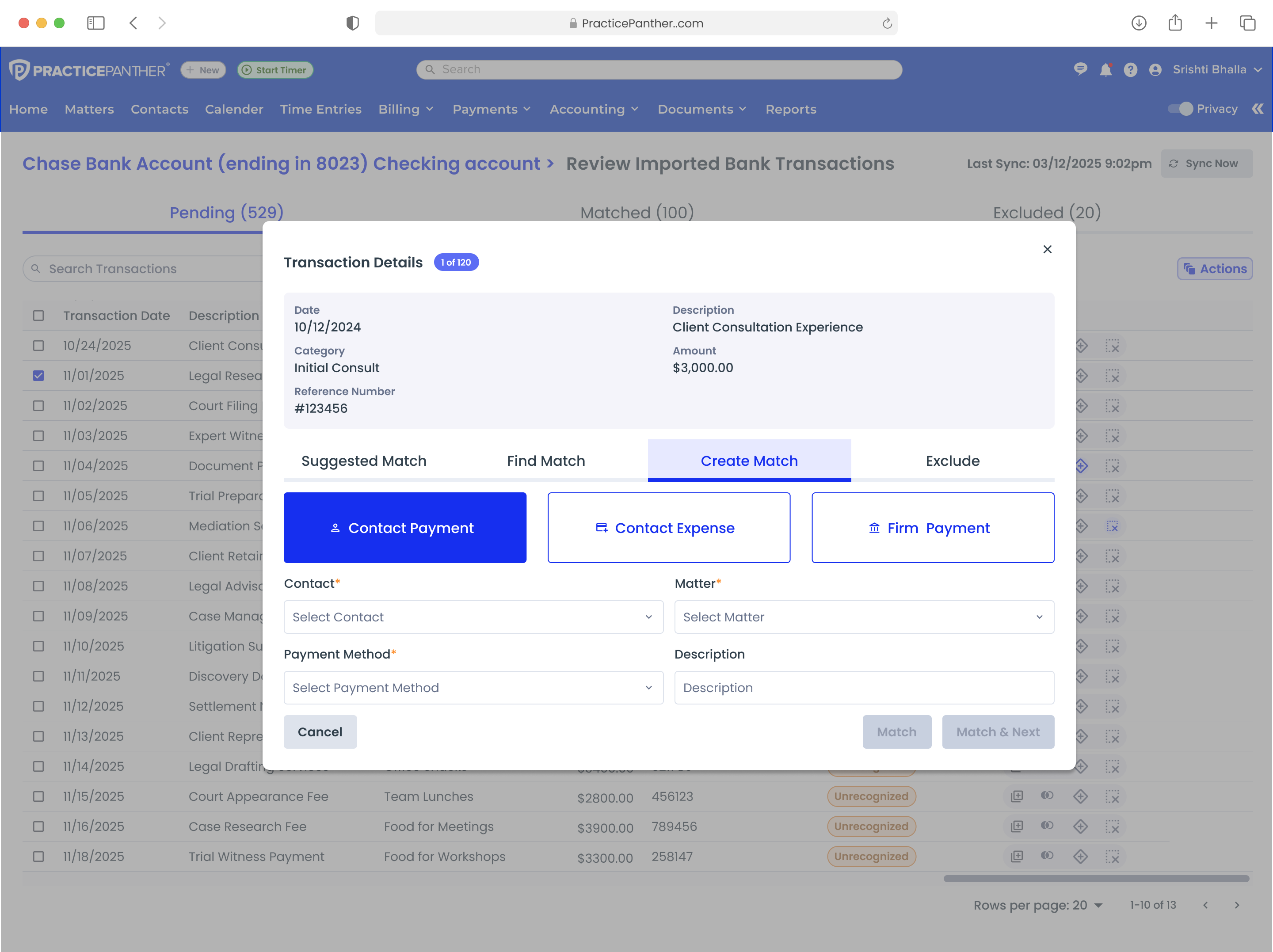
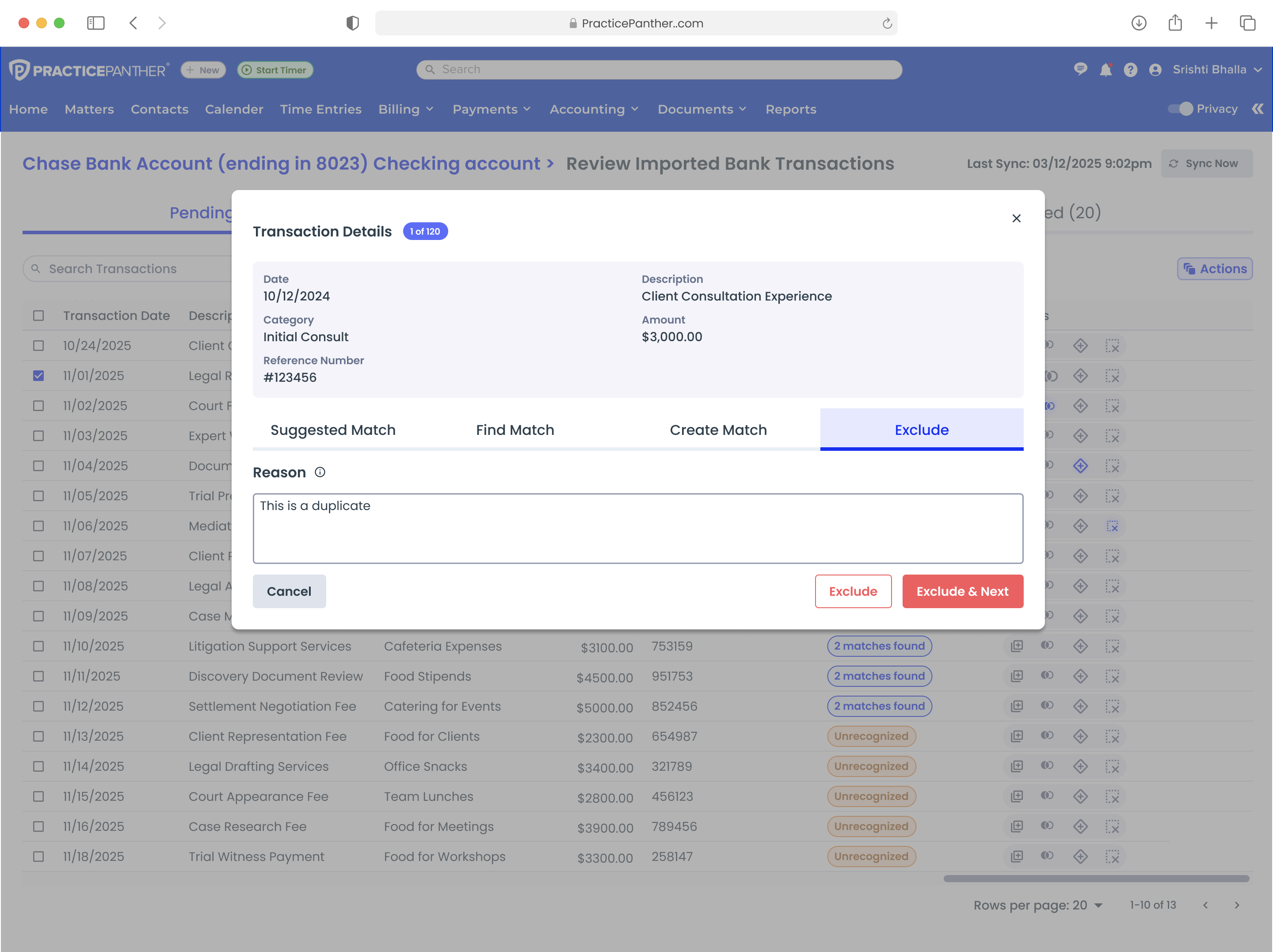
Kept the table as a transaction list but moved matching into focused modals with four tabs: Suggested Match, Find Match, Create Match, and Exclude. Each workflow got dedicated space and clearer information hierarchy.

Iteration 3: Suggested Match modal with transaction details and ranked matches

Suggested Match modal

Iteration 3: Find Match tab with multi-filter search

Find Match with filters

Iteration 3: Create Match with Contact Payment, Expense, and Firm Payment categories

Create new match

Iteration 3: Exclude transaction with required reason field

Exclude transaction

06

Final Solution & Key Features

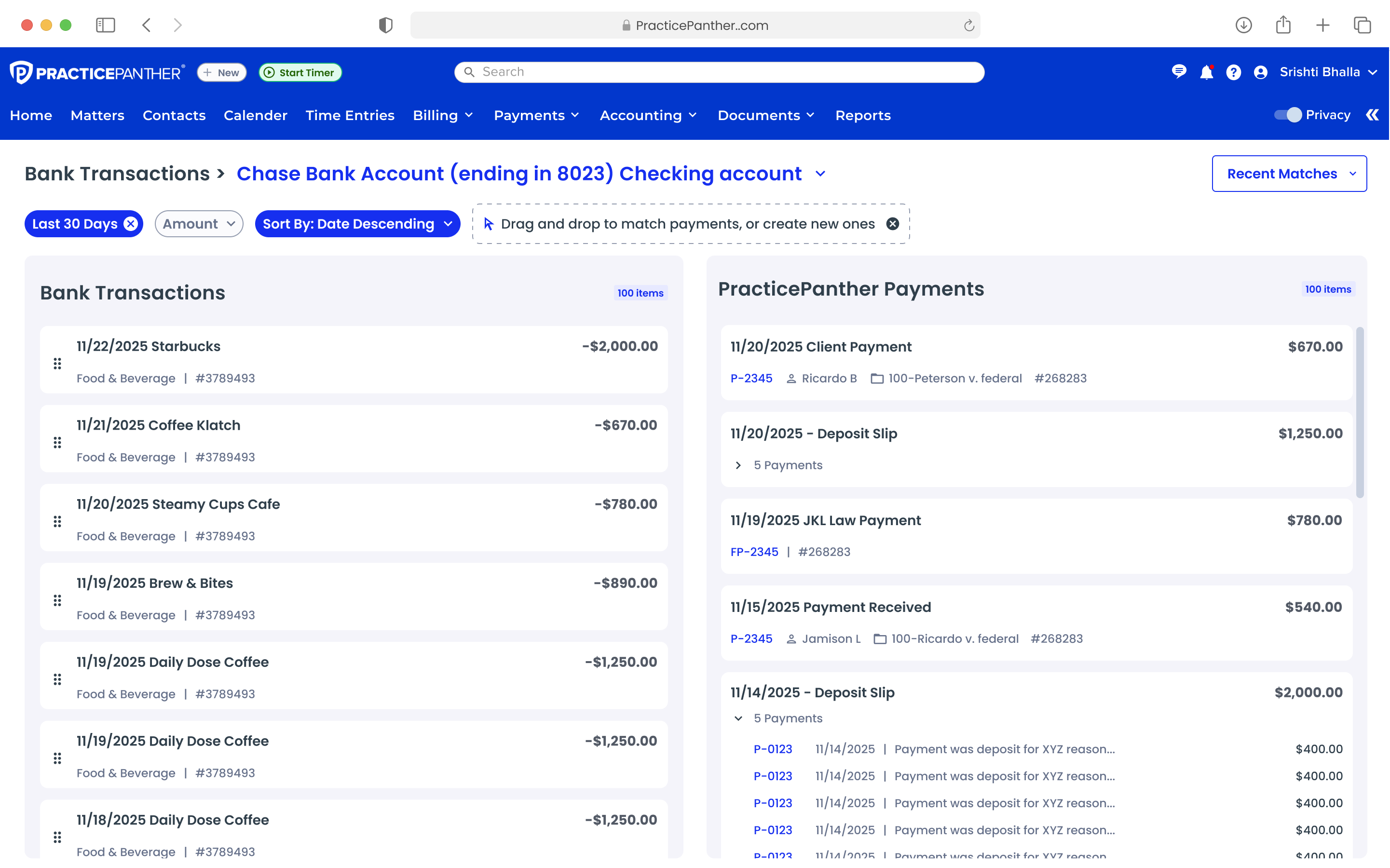
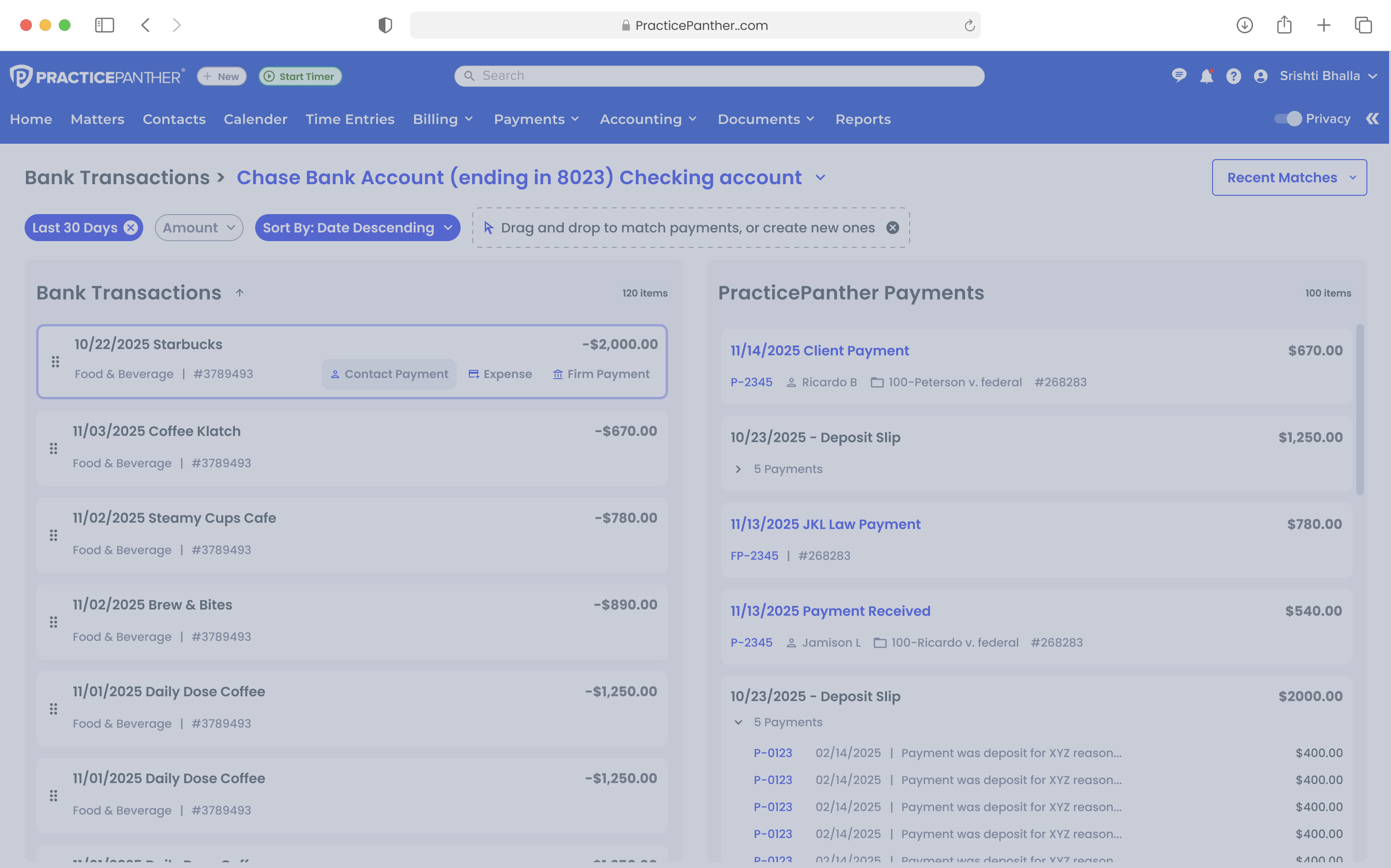
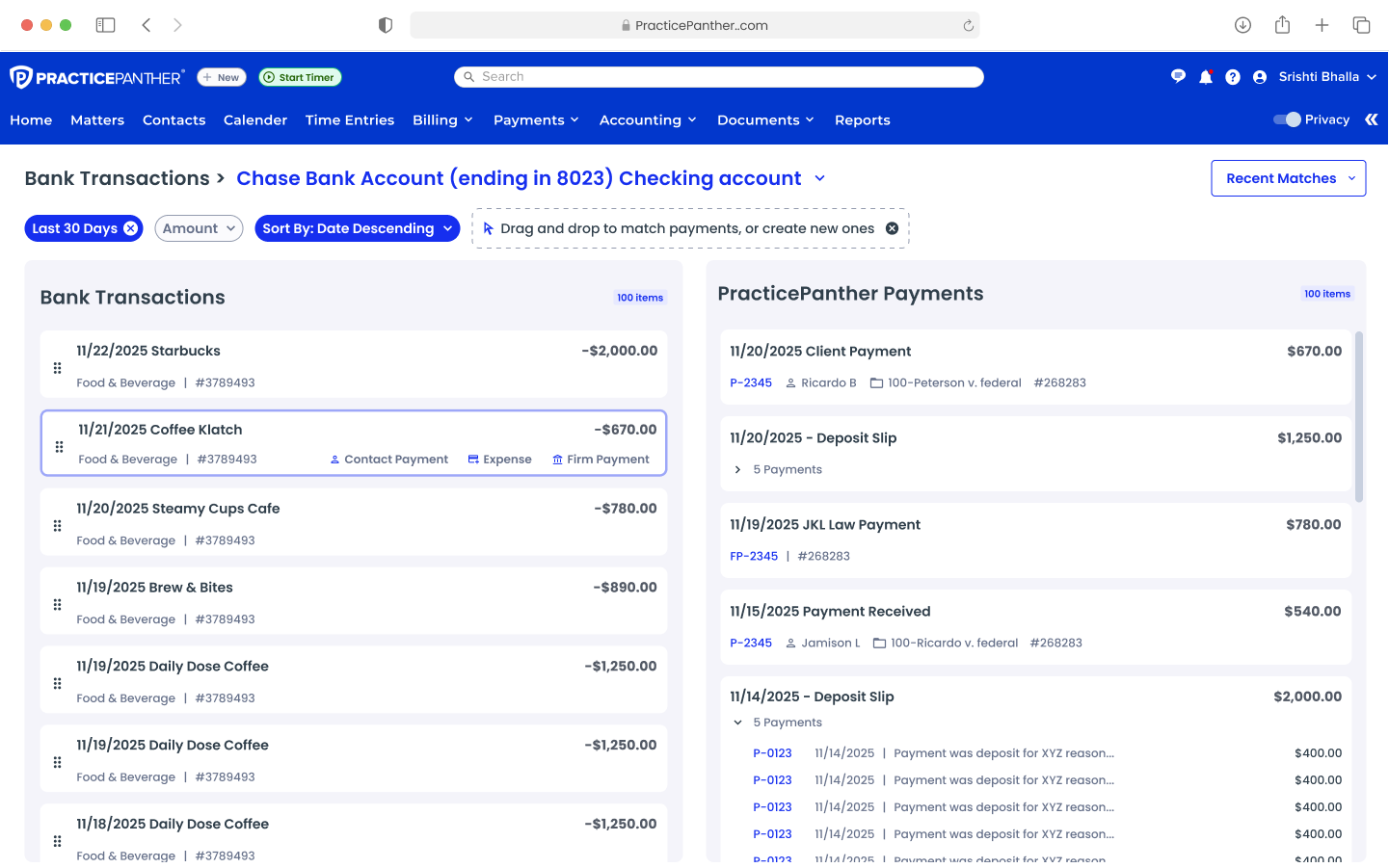
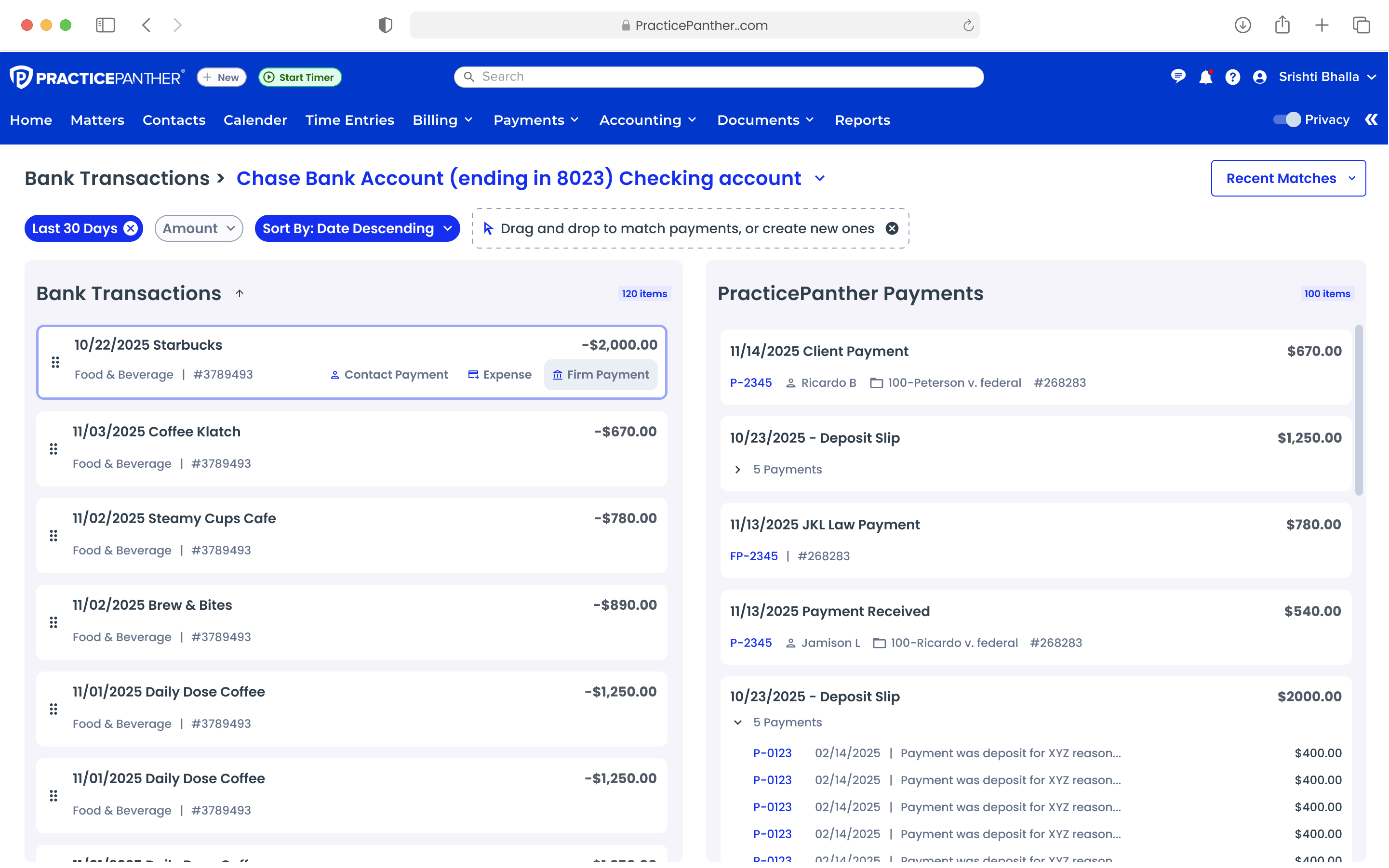
The final design is a drag-and-drop reconciliation interface where users visually match bank transactions to PracticePanther payments on a single screen.

Final Solution: Split-panel reconciliation with Bank Transactions (left) and PracticePanther Payments (right)

Split-panel reconciliation — Bank Transactions (left) vs PracticePanther Payments (right)

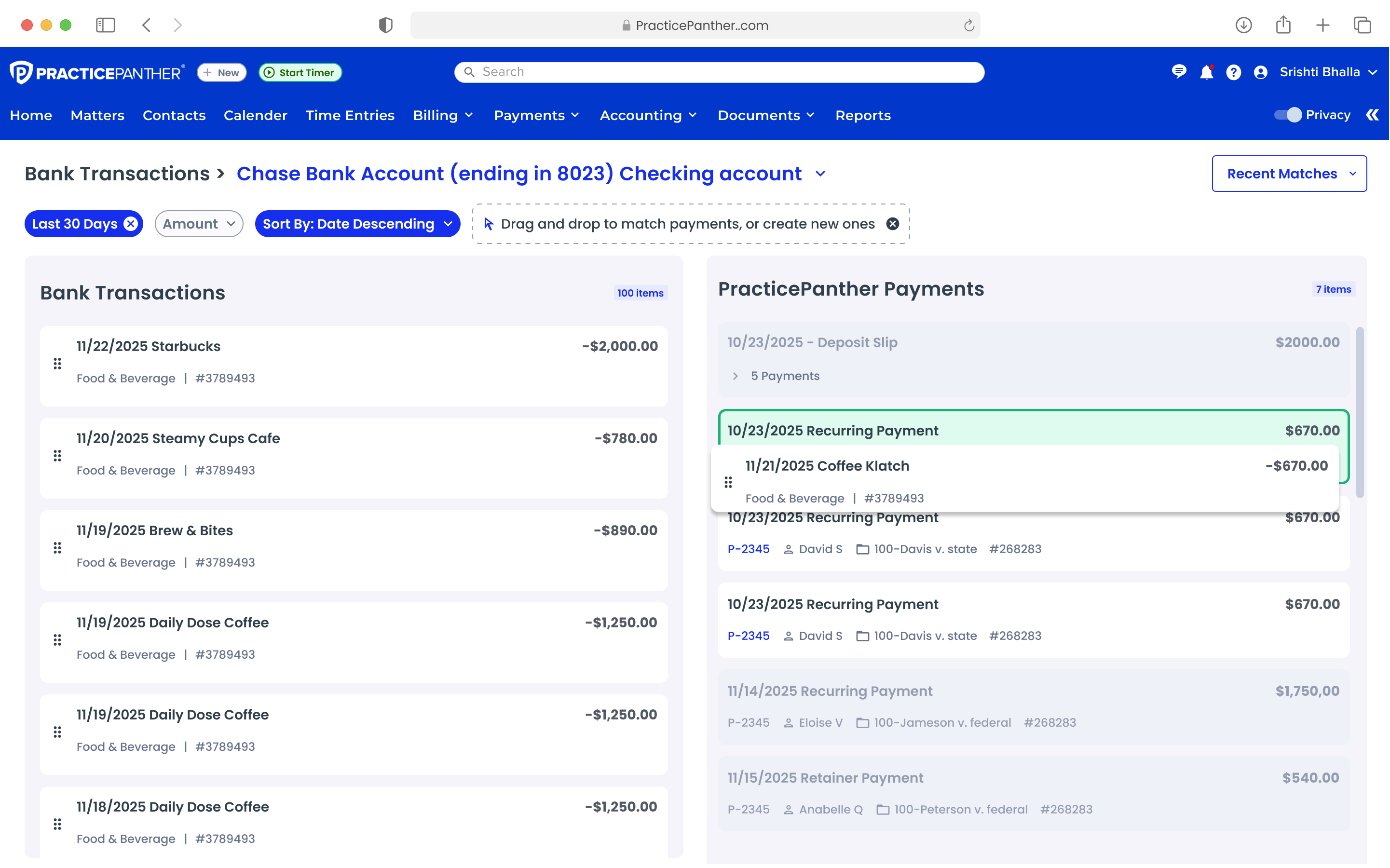
Drag-and-Drop Matching

Users drag bank transactions from the left panel onto PracticePanther payments on the right. A green border and "Valid Match" indicator provides clear visual confirmation before committing.

Drag-and-drop with green Valid Match indicator

Valid match indicator on drag

Match confirmed: bank transaction nested under PP payment

Confirmed match nesting

Full reconciliation overview showing matched and unmatched states

Full reconciliation overview

Matched transactions with detailed metadata

Matched with full metadata

Match Confirmation & Verification

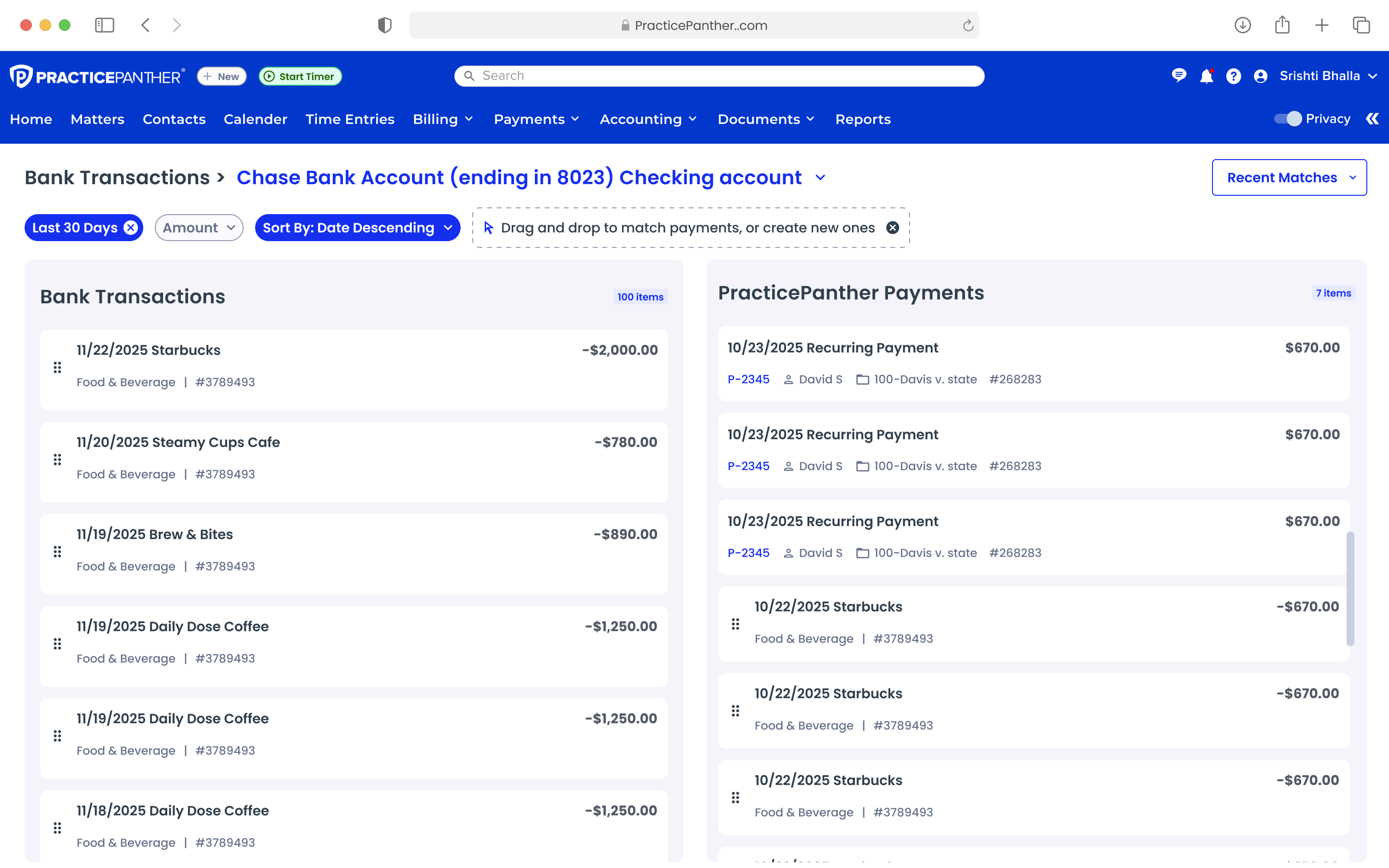
Once matched, the bank transaction nests visually under the PP payment, creating a clear parent-child hierarchy. Accountants see exactly which transaction was matched without navigating away.

Multiple matched transactions listed in the PP payments panel

Expanded view showing multiple matched transactions

Recent Matches & Undo

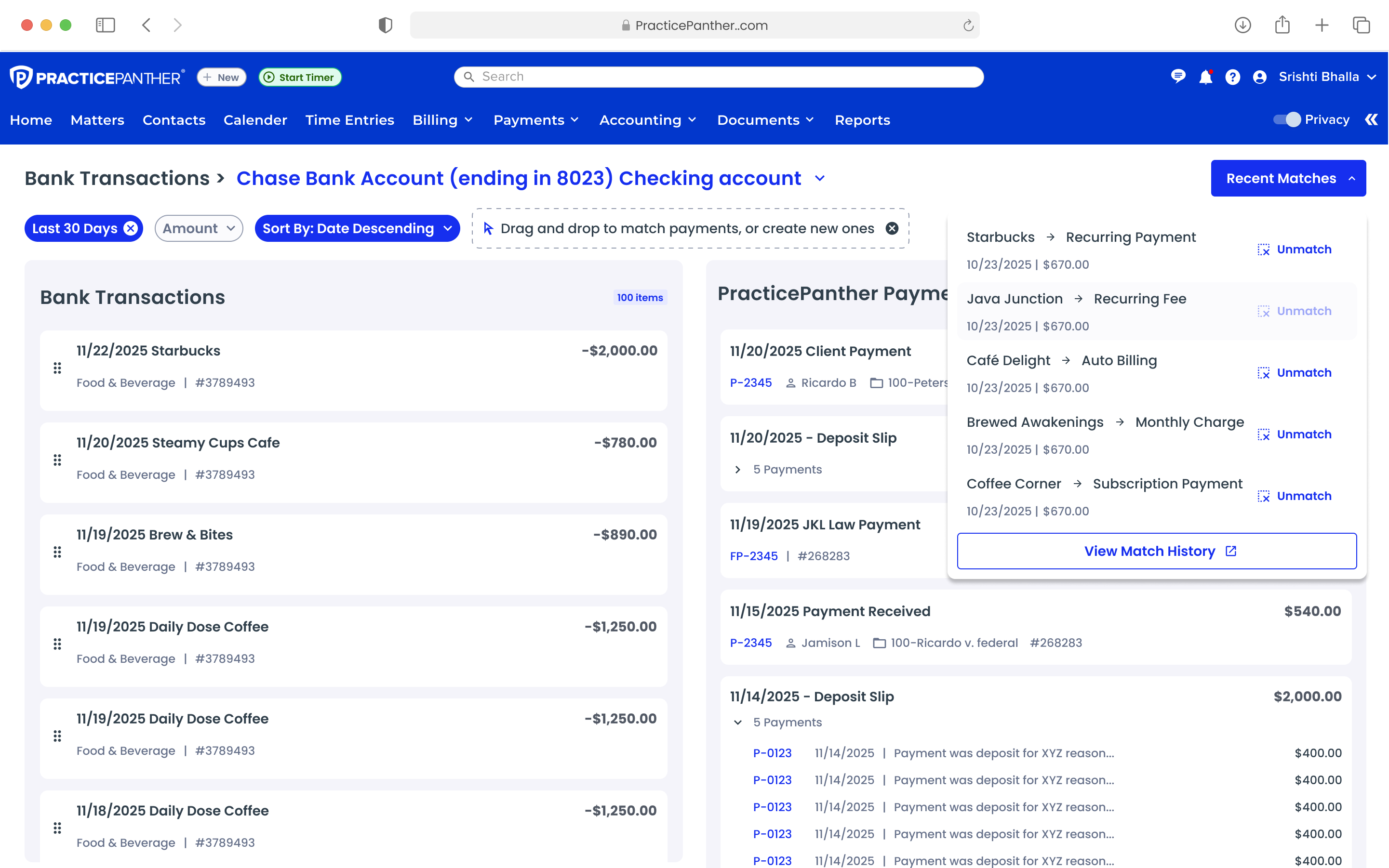
A "Recent Matches" dropdown shows the last several matches with a one-click "Unmatch" option — directly addressing user feedback about needing to undo wrong matches and view match history.

Recent Matches panel with Unmatch buttons

Recent Matches panel

Match history dropdown with Unmatch actions and View Match History link

Match history with one-click Unmatch actions

07

Outcome & Key Learnings

Impact

Moving from CSV to Plaid wasn't just a technology upgrade — it fundamentally changed how law firms manage trust accounting.

Enterprise Adoption Unblocked

Positioned PracticePanther to compete with Clio and MyCase in trust accounting

Manual Work Eliminated

Replaced CSV reconciliation with automated Plaid-powered bank feeds and intelligent matching

Revenue Driver Launched

Foundational feature for Panther Accounting Plus, driving high-value enterprise subscriptions

Key Design Learnings

01

Trust over Speed in Financial Tools

Users need verification states, confirmation steps, and undo capabilities before trusting a system with financial data. Prioritize correctness over efficiency.

02

Single-Screen Mental Model

Accountants want to see both data sources simultaneously. Modal and tab-based approaches created too much context switching. The split-panel design matched how they already work.

03

Iterative Pivots Build Better Products

Three full iterations revealed the initial modal-heavy approach was fundamentally wrong. The drag-and-drop pivot was only possible because we tested early and listened.

04

Domain Expert Collaboration is Non-Negotiable

Aligning with accounting SMEs was critical for strict legal trust-accounting rules. Without their input, we'd have missed compliance-critical details.

Next Project

Tara Blockers Report

Automating blocker detection to accelerate engineering teams

View Project